
How to Choose the Right Crypto Card for Online Payments With Cozy Card?
Find a crypto card setup for online shopping, AI tools, and more.

The right crypto card is not necessarily the one with the longest feature list. It is the one that fits the payment methods and online services you use most.
A crypto card for online payments may be used for subscriptions, AI tools, work software, online shopping, payment wallets, and travel bookings.
Cozy Card is a Cwallet product with options you can compare by intended use, issuing location, fees, initial top-up requirements, and current support information.
This guide helps you evaluate a Cwallet Cozy Card based on the payments you actually want to make.
Step 1: Start With Your Everyday Online Payments
Before deciding how to choose a crypto card, make a quick list of the online payments you make regularly.
- AI and creative tools: Current merchant categories include ChatGPT, OpenAI, Claude AI, Anthropic, Midjourney, DeepL, and Perplexity. If you are looking for a crypto card for AI tools, begin by checking current support for your chosen platform. You can also learn how to pay for ChatGPT Plus with USDT.
- Work and developer services: Cwallet’s current merchant-support information includes Notion, GitHub, GoDaddy, Vultr, and Microsoft.
- Payment wallets: Apple Pay, Google Pay, PayPal, Alipay, WeChat Pay, and Line Pay may be important if you prefer wallet-based checkout.
- Subscriptions and communication: X/Twitter, Facebook, and Telegram appear in current support categories. For one use case, explore how to subscribe to Telegram Premium with USDT.
- Online shopping: Amazon, eBay, Shopify, Shopee, Temu, Alibaba, and Etsy are among the currently displayed examples for users seeking a crypto card for online shopping.
- Travel and lifestyle: Booking and Meituan are currently listed examples for users considering a crypto card for travel bookings.
If you need a crypto card for subscriptions or a specific online service, check Cwallet’s current merchant-support information for card-specific compatibility before you apply or pay.
Step 2: Choose Your Payment Method First
Your preferred payment wallet or checkout method may narrow the Cozy Card options that fit your needs. For example, a user seeking a crypto card for Apple Pay may need a different option from someone who primarily wants a crypto card for PayPal or a crypto card for Google Pay.
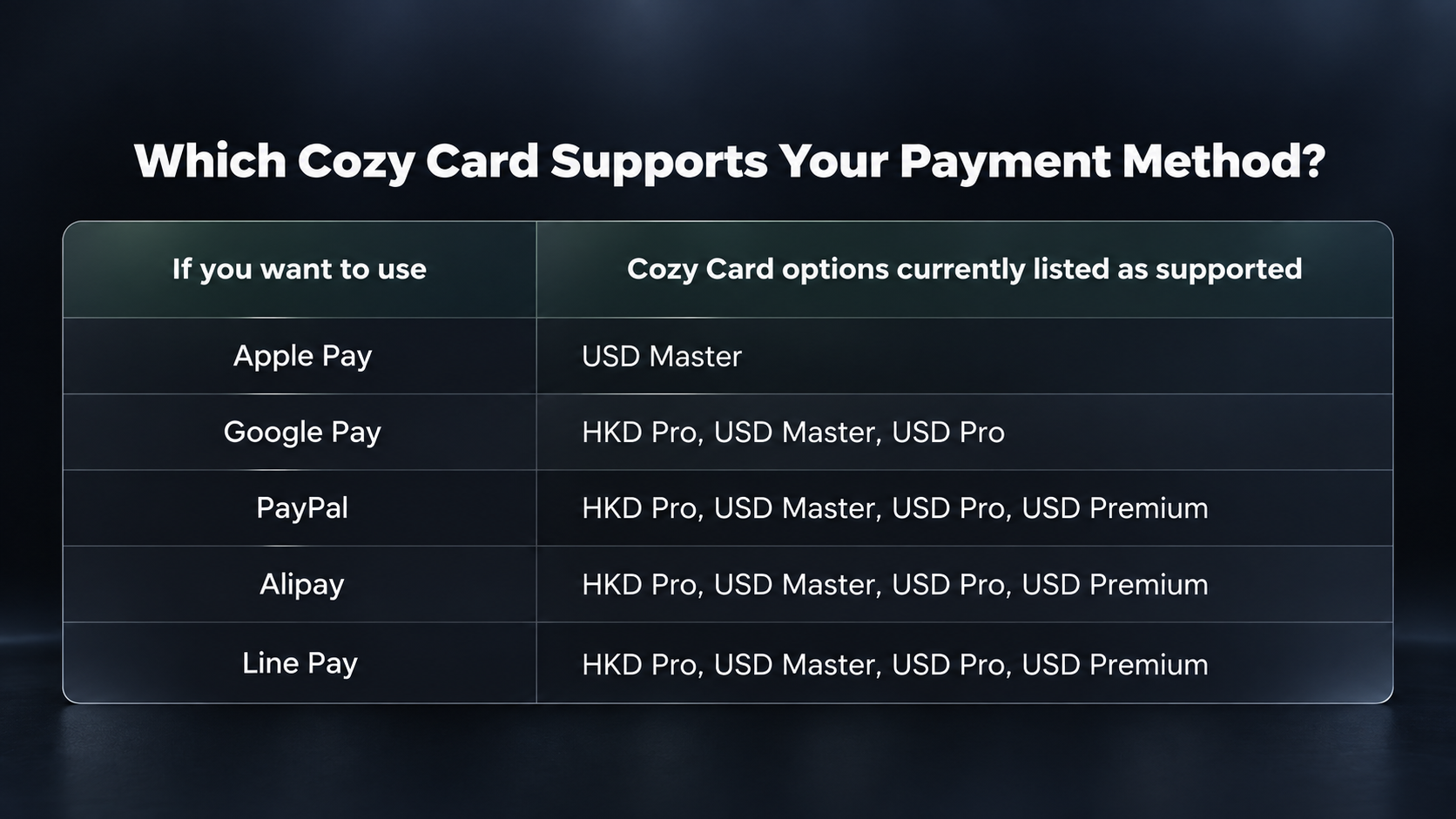
The support shown on the Cozy Card page may change, and merchant or wallet requirements can vary. Check the latest in-app details before applying or making a payment.
Step 3: Compare Cozy Card Options Before Applying
Think of this as a practical match-up guide rather than a search for one “best” card. The Cozy Card page currently lists four options, each with different issuing locations, activation fees, initial top-up requirements, and payment-method support.
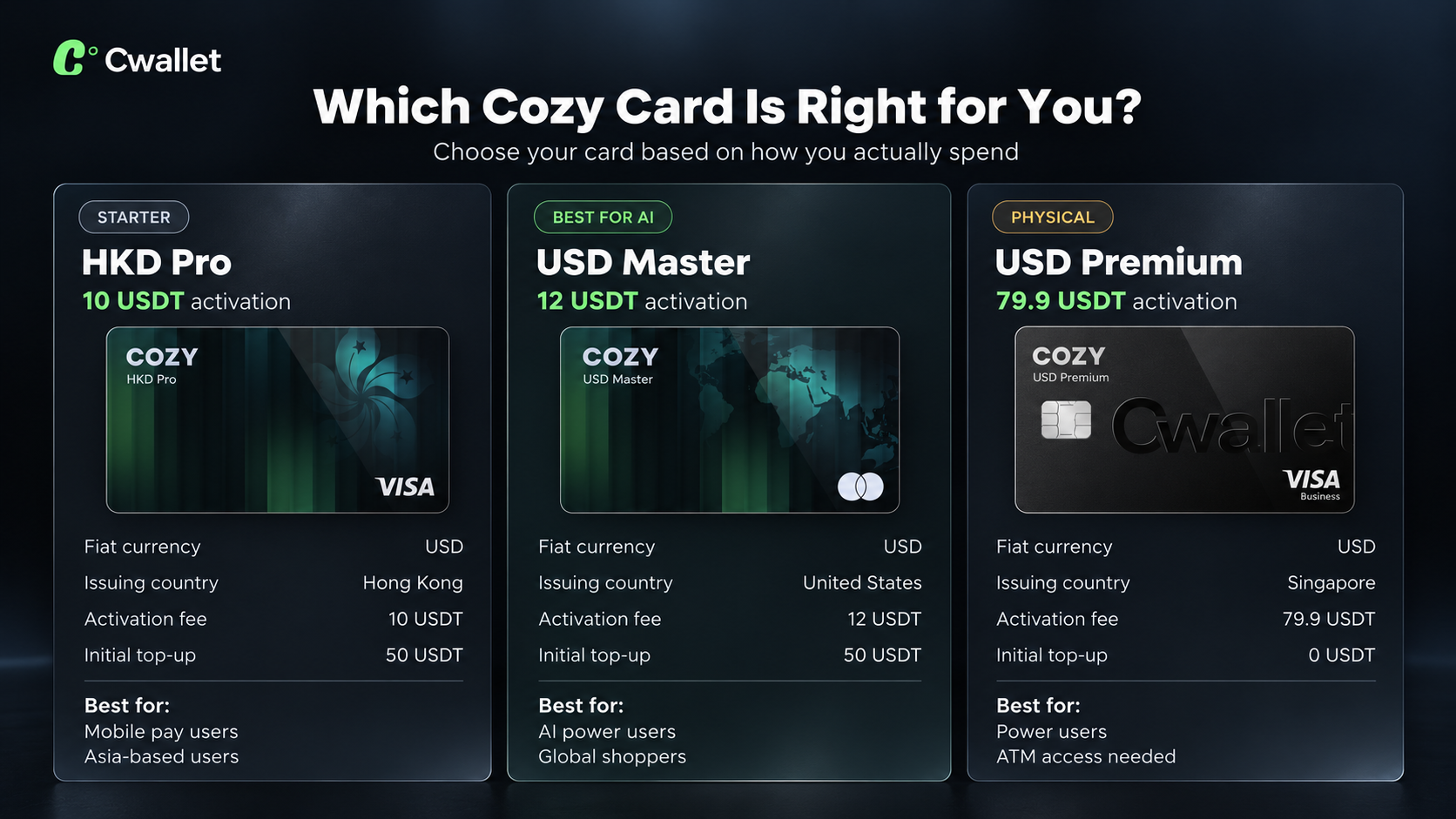
No option is automatically right for everyone. A user focused on wallet checkout may prioritize listed payment-method support, while someone who wants a currently listed physical-card option may consider USD Premium Physical.
Review current in-app availability, fees, eligibility, applicable terms, and card details before applying. Card availability, issuing location, merchant support, payment-method support, and product settings may change.
Step 4: Check the Merchant Before Checkout
Choosing a card option is only part of the process. Card availability and a merchant's own checkout rules both matter when you are ready to pay.
- Confirm the relevant merchant is currently listed for your intended card option.
- Check the payment method required at checkout.
- Review the card balance and applicable displayed information before paying.
- Use only official merchant checkout pages.
- Keep card details and verification information private.
Payment outcomes depend on merchant policies and current product settings. Merchant acceptance and checkout requirements may vary, so check the latest in-app information, card terms, merchant rules, and checkout details before paying. For additional use cases, see how to use Cozy Card with PayPal or buy Steam games with crypto.
Turn One Card Choice Into More Everyday Possibilities
A Cozy Card decision does not need to revolve around a single subscription, platform, or checkout. You can explore current crypto card merchant support across AI tools, work software, social services, e-commerce, and travel platforms.
The goal is not to make one card fit every checkout. It is to find a card option that better matches your everyday online payment habits. Check current support by card option, then choose based on the payment methods and merchants that matter most to you.
🎓 Your Quick Crypto Card Checklist
- List the payment wallets and online services you use most.
- Check current merchant and payment-method support for the card option you are considering.
- Compare issuing location, activation fee, and initial top-up requirement.
- Review current eligibility, applicable fees, card terms, merchant policies, and checkout requirements.
- Download the Cwallet App to view the latest Cozy Card options before applying.
Choose for the Crypto Payments You Actually Make
Choosing a crypto card for online payments starts with how and where you pay online. Review Cozy Card options by payment method, issuing location, activation fee, initial top-up requirement, and current merchant-support information.
Always review the latest app information and applicable terms before applying or paying.
Cwallet: Your All-in-One Crypto Solution
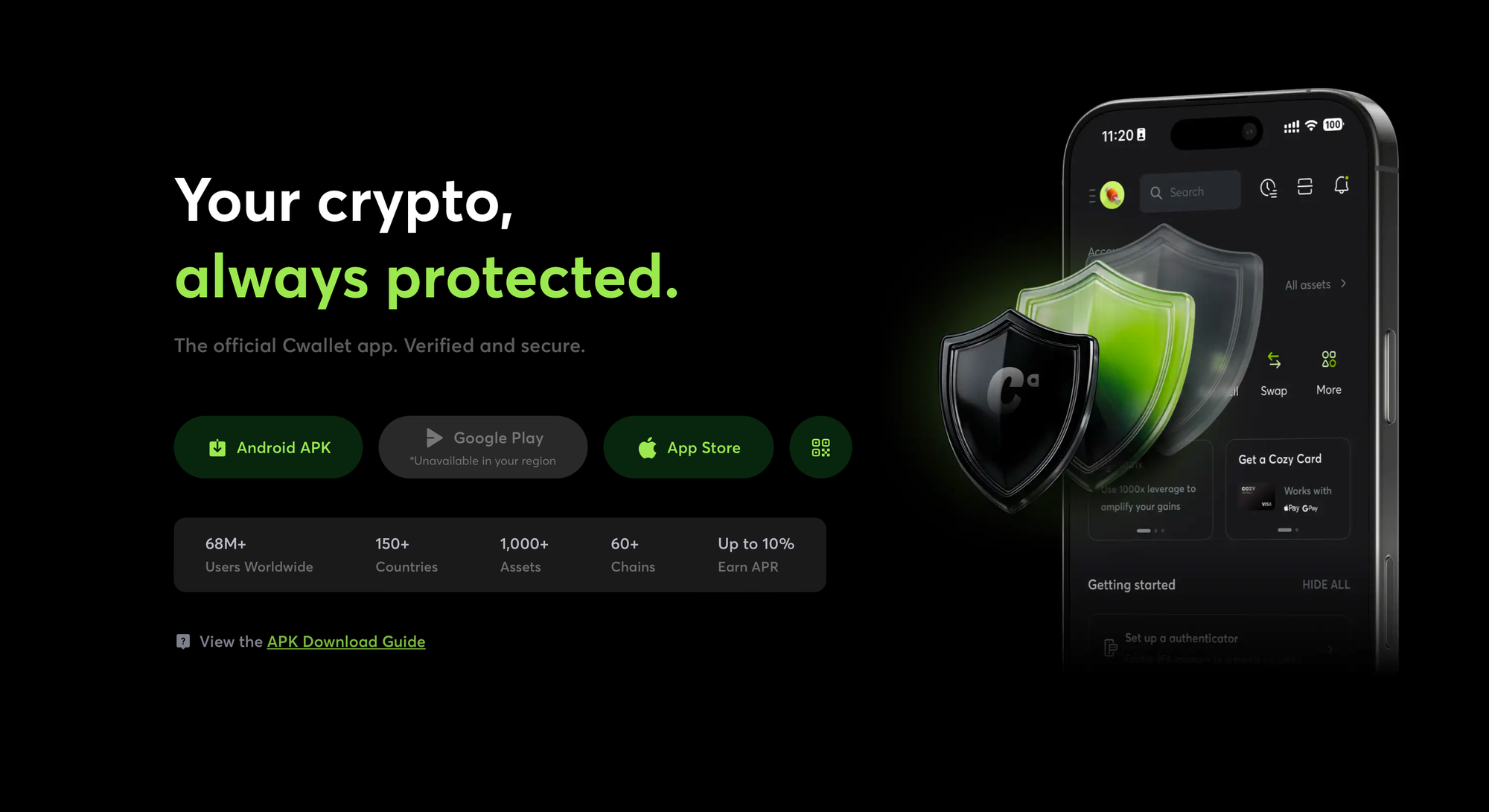
Cwallet allows you to store, trade, and manage 1,000+ cryptocurrencies across 60+ blockchains, offering flexibility for both Spot Trading and Futures Trading. With features like Perpetual Trading, Cozy Card, and more, Cwallet empowers you to make the most of your crypto journey.
Join the Community & Earn More
Trade daily, earn more. Cwallet's Telegram and Discord communities host regular trading challenges across Market Battle, Trend Trade, 1001X, and Tap Grid, with extra rewards waiting for active participants.
👉 Join us on Telegram or Discord to participate in ongoing events and claim your rewards.
Official Links
Official Site: https://cwallet.com
X: https://x.com/CwalletOfficial
Disclaimer
This content is for informational purposes only and does not constitute financial advice. Crypto assets are volatile, and all investment decisions should be based on your own research (DYOR). Cwallet assumes no liability for any losses.